Interactive Scenario-Lab Interfaces#
myMeans provides terminal and local-browser views over the same means.lab application service.
Both interfaces show the same validated scenarios, deterministic variants, strategy outcomes, sensitivities, warning provenance, and comparison rule.
Neither interface implements financial calculations of its own.
Important
Every result is a conditional deterministic projection, not a prediction or financial advice. The interfaces assign no likelihood, confidence, or recommendation to a supplied alternative. They are local and read-only: neither interface changes a Ledger or its input document.
Install Only the Interface You Need#
The base package and means-plan do not install an interactive framework.
Choose the Textual TUI, the FastAPI web interface, or both:
uv tool install 'my-means[tui]'
uv tool install 'my-means[web]'
uv tool install 'my-means[ui]'
The launchers parse --help before importing these optional dependencies, so their help remains available in a base-only installation:
means-tui --help
means-web --help
The hosted model integration remains a separate llms extra.
Installing tui, web, or ui does not enable a remote model or send financial content to one.
Terminal Interface#
Launch the full-screen TUI with a YAML or JSON scenario-lab document:
means-tui --scenario fictional-scenario.yaml
Running means-tui without --scenario loads the packaged, fully fictional canonical scenario, so the views are populated with example data from first paint.
Press l to enter the path of a different document, or r to recompute the loaded request.
The source is read and evaluated in a worker thread so the screen remains responsive.
The last valid result stays visible while a newer request is evaluated.
If loading or recomputing fails, the retained result is explicitly marked stale and the redacted problem list is shown; an older worker can never replace the result of a newer request.
A persistent disclosure bar always shows the method (“conditional deterministic projection, not prediction or advice”), the freshness state, the safe source label, and the variant count against the variant limit.
The seven views are:
Overview — scenario name, horizon, source label, variant count, and the service capabilities (method, selection rule, override targets, sensitivity metrics, strategies).
Inputs — exact base-scenario assumptions: cashflows and debts as written.
What-ifs — named hypotheses, their alternatives, and each alternative’s typed overrides.
Variants — stable variant identities, chosen alternatives, eligibility, rule-selected strategy, and retained shortfalls.
Compare — per-variant strategy summaries: final cash, remaining debt, total interest, payoff date, shortfall count, and the rule-selected row.
Warnings — projection warnings grouped by variant, strategy, and date.
Method — the deterministic method, selection rule and objective order, variant limit, sensitivity ranking, and the no-advice disclosure.
The complete binding contract is available with ? or F1:
Key |
Action |
|---|---|
|
Exit immediately from every screen, field, and work state |
|
Quit from the main screen (never fires while a field is focused) |
|
Open the load dialog for a YAML or JSON source |
|
Recompute the loaded request |
|
Open complete help ( |
|
Move between views |
|
Submit the open load dialog |
|
Cancel the load dialog or close help |
Because q is bound only on the main screen, it remains typeable in the path field.
Ctrl-C is the universal exit floor even when help, a focused input, or calculation work is active.
The TUI requires both stdin and stdout to be terminals.
When either is redirected, it refuses before starting the full-screen runtime (exit code 2) and names means-plan project --scenario PATH --json, means-plan compare --scenario PATH --csv, and means-web as alternatives.
Local Web Interface#
Start the browser interface on its fixed IPv4 loopback host:
means-web
means-web --port 8123
Then open http://127.0.0.1:8736/, or the selected port, in a local browser.
There is intentionally no --host option.
The server disables access logging and identifying response headers and cannot be widened to a LAN listener through the command line.
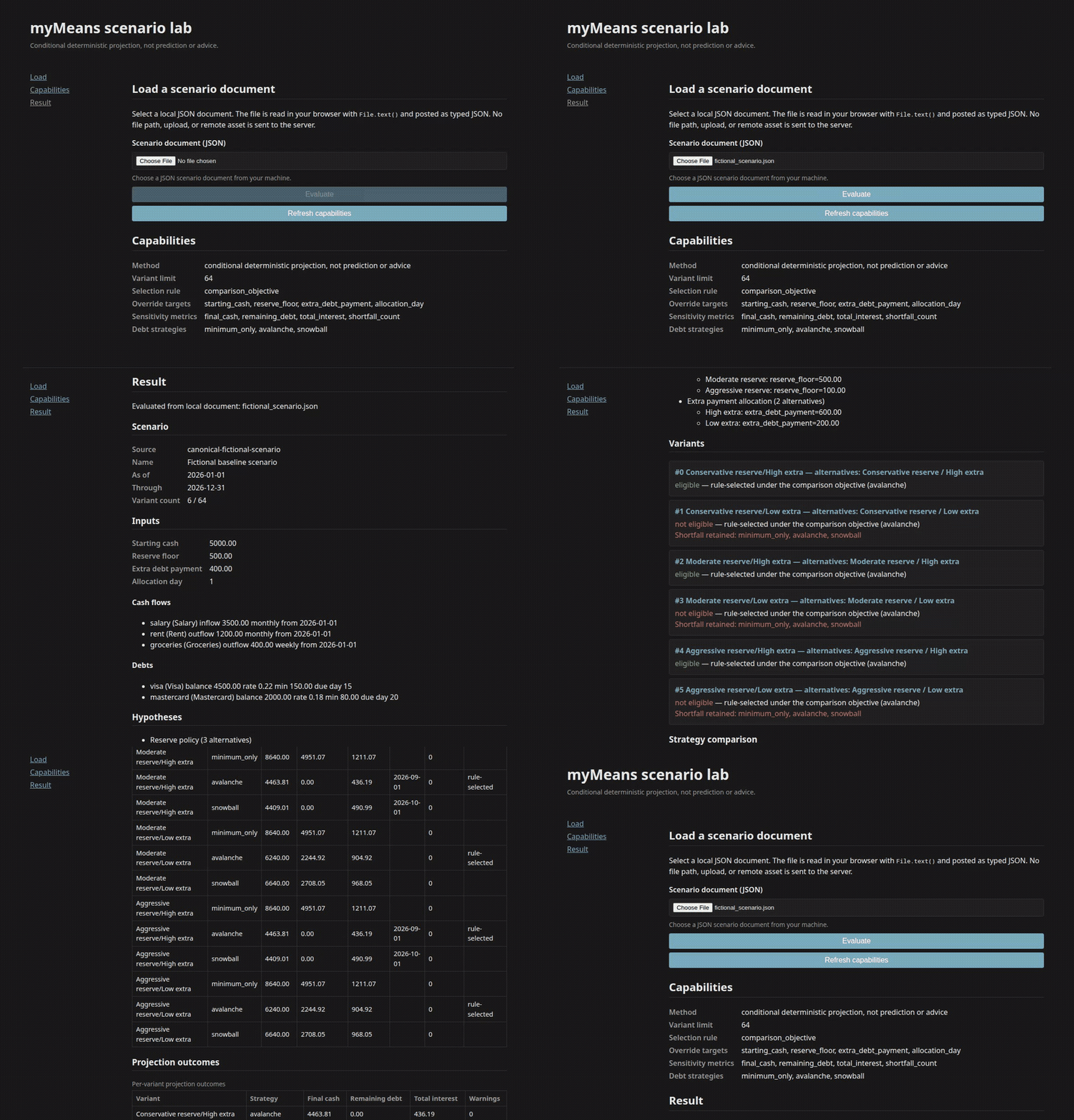
The browser accepts one local JSON document through its native file chooser. JavaScript reads the file with the browser file API, parses it locally, and sends the typed JSON document to the loopback service. The server receives neither the device path nor an upload form and exposes no server-filesystem parameter. The workflow is operable with ordinary Tab, Shift-Tab, Enter, and button controls; status changes are announced through an ARIA live region, and the comparison tables remain scrollable at a narrow viewport.
HTTP Boundary#
Method |
Route |
Purpose |
|---|---|---|
|
|
Package-local HTML application shell |
|
|
Package-local stylesheet |
|
|
Package-local interaction code |
|
|
Override targets, strategies, metrics, limit, method |
|
|
Evaluate one strict |
These are the only routes; the interactive API documentation and schema endpoints are disabled.
POST /api/v1/evaluations requires application/json and a body no larger than 65,536 bytes.
It rejects non-loopback Host headers, foreign browser origins, recursively unknown fields, and keys shaped like server paths.
Validation errors carry a redacted {error: {kind, message}} payload that never echoes submitted values or file paths.
Decimal money is serialized through the typed models’ own JSON, so exact cents survive as JSON text, not a binary JavaScript number.
Every response is non-cacheable and carries a no-referrer, no-MIME-sniff, no-framing, same-origin, self-content-only browser policy. The application uses package-local assets and text-only DOM insertion. It has no CORS policy, cookie, session, persistence, browser storage, service worker, CDN, remote asset, or telemetry seam.
Warning
Loopback is a transport boundary, not authentication.
Run means-web only on a computer and account you trust, close it when finished, and do not place it behind a proxy or expose its port.
Non-loopback use needs a separate authenticated and encrypted design.
Reading the Results#
Both interfaces label a strategy rule-selected under the comparison objective.
The objective order is lowest remaining debt, then lowest total interest, then fewest counted shortfalls, with a fixed strategy-preference tie-break (avalanche, then snowball, then minimum_only).
The lab additionally marks each variant eligible or not: a variant is ineligible only when every strategy ended with remaining debt or a counted shortfall, in which case the rule-selected strategy is still shown, flagged not eligible, with the shortfalls retained and visible.
The terminal debt_remains warning is not itself a counted shortfall, but the remaining debt it reports is part of the eligibility test.
This application-layer eligibility flag is deliberately more cautious than the recommended field returned by means-plan compare, which applies the same objective with no eligibility gate.
Neither label is advice.
Sensitivity records describe the spread observed across the evaluated variants for each hypothesis and metric: a range plus the low and high variant labels. They do not establish causation, probability, confidence, or real-world importance.
Warnings are implemented rule triggers, not a complete risk model. An empty warning view says No implemented warning rule fired. Zero warnings does not mean that a scenario is safe, complete, likely, affordable, or suitable for a real decision.
Privacy and Read-Only Boundary#
The shared service receives document content plus a safe label, not an authoritative absolute path.
The TUI alone reads the explicit path selected on the same computer, and displays only its basename as the source label.
The browser reads its selected file locally and sends JSON only to
127.0.0.1.No interface reads historical Ledger data, contacts a financial provider, calls an LLM, or infers omitted assumptions.
No interface mutates a Ledger, source document, or browser-selected file.
Labels, assumptions, outcomes, and warning messages can contain private information; keep private documents, copied output, and screenshots outside the public repository.
For automation, reproducible files, or pipes, prefer means-plan ... --json or call the typed means.lab API directly.
The TUI is intentionally terminal-only and the web interface is intentionally loopback-only.